
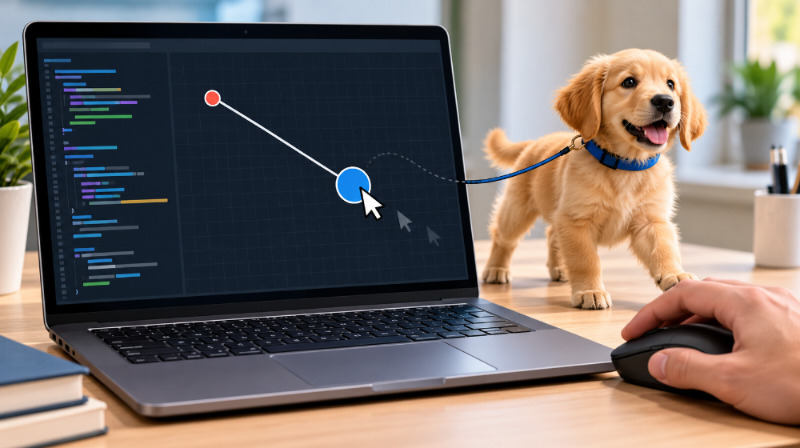
If you are working on 9.7.4 leash, the exercise is best understood as a small interactive graphics program rather than something that requires complicated mathematics. Publicly available descriptions consistently associate the activity with CodeHS graphics and a visual setup involving a circle, a line, and mouse movement. CodeHS’s own documentation confirms the underlying graphics methods, including Circle, Line, setPosition(), setEndpoint(), and mouse-movement callbacks. Because lesson numbering can vary between CodeHS courses or versions, the exact assignment instructions should always be checked in the student’s own course.
What Is the Leash Exercise?
The 9.7.4 leash exercise is generally described as an interactive JavaScript graphics task. The basic visual idea is straightforward: a circle represents a moving object while a line connects that object to a fixed point. When the mouse moves, the circle follows the cursor and the movable end of the line follows the same coordinates.
This exercise is useful because it combines several beginner programming concepts in one small project. Students work with graphical objects, variables, functions, coordinates, and event callbacks. CodeHS documentation shows that mouse movement can be connected to a callback function through mouseMoveMethod(), with the event object providing the current X and Y coordinates.
The Basic Visual Relationship
Think of the program as having two important points. One point remains fixed, normally serving as the anchor of the leash. The second point represents the current mouse location. The line connects these two points, while the circle is positioned at the moving point.
This makes the behavior easier to understand than thinking of the leash as a special object. In practice, it is simply a line whose endpoint is updated as the mouse moves.
The CodeHS graphics documentation specifically demonstrates changing a line’s endpoint with setEndpoint(x, y).
Understanding the Graphics Objects
The exercise relies on basic CodeHS graphics objects. A Circle can represent the ball or moving object, while a Line can represent the leash. These objects must first be created before their properties or positions can be changed.
For example, CodeHS documents creating a circle with new Circle(...), positioning it with setPosition(), and adding it to the canvas with add(). The graphics documentation also identifies Line as one of the available shape constructors.
The important distinction is that creating an object and displaying it are separate actions. A program can create a graphics object in memory and then use add() to place it on the visible canvas.
Why Object References Matter
A moving object needs to remain accessible after the initial setup. That is why many implementations declare variables for the circle and line outside the setup function.
The setup function can assign the newly created objects to those variables. Later, the mouse callback can use the same references to update their positions.
This approach avoids creating an entirely new circle and line every time the mouse moves. Instead, the existing graphics objects are updated.
How Mouse Events Drive Movement
One of the most important ideas in 9.7.4 leash is the mouse event callback. Rather than repeatedly asking where the mouse is, the program registers a function that CodeHS can call when mouse movement occurs.
CodeHS documentation explicitly describes mouseMoveMethod(functionToCall) as a mouse-movement callback. It also notes that the function name is passed without parentheses.
A typical structure looks conceptually like this:
mouseMoveMethod(onMouseMove);
The important point is that onMouseMove is supplied as the callback function. Writing onMouseMove() would mean calling the function immediately rather than giving CodeHS the function to call when movement occurs.
Reading the Mouse Coordinates
The event object supplied to the callback contains information about the mouse position. CodeHS’s documentation demonstrates using e.getX() and e.getY() to retrieve the horizontal and vertical coordinates.
Those coordinates can then be used to move the circle and update the line endpoint.
The relationship is simple:
mouse X/Y → circle position + line endpoint
Using the same coordinates for both keeps the moving end of the leash connected to the circle.
Why setEndpoint() Is Important
A common source of confusion in the 9.7.4 leash exercise is deciding which line method to use. If the exercise requires one end of the line to remain fixed, moving the entire line is not the desired behavior.
CodeHS provides setEndpoint(x, y) specifically for changing a line’s ending point. Its official documentation even uses line.setEndpoint(e.getX(), e.getY()) in a mouse-event example.
That makes the intended relationship much clearer. The first point acts as the anchor, while the endpoint responds to the mouse.
If the program instead changes both ends of the line, the visual result can be very different because the fixed anchor would no longer remain stationary.
Fixed Point and Moving Point
You can picture the line as having two coordinates:
Fixed anchor  ───────────>  Moving endpoint
                              ↑
                           Mouse
The anchor stays where it was created. The endpoint receives the latest mouse coordinates.
This coordinate-based approach is the central idea behind the exercise.
Positioning the Circle Correctly
The circle also needs to use the mouse coordinates. CodeHS’s documentation demonstrates positioning a circle with:
ball.setPosition(e.getX(), e.getY());
This means the circle’s position is updated using the current mouse event.
The advantage of using the same coordinates for the circle and line endpoint is visual consistency. If both receive the same X and Y values, the circle remains attached to the moving end of the line.
Students sometimes try to adjust the coordinates unnecessarily by adding or subtracting the circle’s radius. For a CodeHS Circle, setPosition() is intended to position the circle, so the correct implementation should follow the requirements and coordinate behavior of the particular assignment rather than adding adjustments without a reason.
Common Errors to Check
Several small mistakes can prevent a leash-style graphics program from working correctly. One is forgetting to register the mouse callback. Without mouseMoveMethod(), the program has no instruction connecting mouse movement to the update function.
Another common issue is using parentheses when registering the callback. CodeHS specifically demonstrates passing the function name without parentheses.
A third problem is updating the wrong part of the line. If the fixed anchor is supposed to remain stationary, the endpoint should be the part that changes.
Finally, check variable scope. If the mouse callback needs to update a circle or line created during initialization, those objects must remain accessible to the callback.
A Simple Way to Debug the Exercise
When the program does not behave as expected, test one relationship at a time. First confirm that the circle appears on the canvas. Then confirm that the mouse callback is being registered. Next check whether the circle receives the current X and Y coordinates.
After that, check the line independently.
If the circle moves but the line does not, inspect the line update. CodeHS documents setEndpoint() as the method for changing the line’s endpoint.
If the line moves but the circle appears detached, compare the coordinates being supplied to both objects. They should correspond to the same moving position when that is what the assignment requires.
This systematic approach is usually more useful than changing several lines of code at once.
What This Exercise Teaches
The value of the 9.7.4 leash exercise extends beyond the particular picture on the screen. It introduces an important programming pattern: responding to user events and updating existing objects.
The same general concept appears in interactive graphics, games, drawing tools, drag-and-drop interfaces, and other applications. A user performs an action, the program receives event information, and the program updates its visual state.
The exercise also encourages students to think in coordinates. A graphical object is not simply “moving”; its position is represented by numerical X and Y values.
That combination of events, coordinates, functions, and object properties forms a useful foundation for more advanced interactive programming.
Conclusion
The 9.7.4 leash exercise is a compact introduction to event-driven graphics in CodeHS. Its central idea is to connect a moving circle and a line endpoint to the mouse while keeping the other end of the line fixed. CodeHS’s official documentation supports the relevant programming concepts, including mouse callbacks, event coordinates, circles, lines, and endpoint updates. Because course numbering and assignment requirements can vary, students should compare their specific exercise instructions with any general explanation before implementing the program.
FAQs
What is the 9.7.4 Leash exercise?
It is an interactive graphics exercise commonly associated with CodeHS in which a circle and line respond to mouse movement using coordinates and event callbacks.
What does mouseMoveMethod() do?
It registers a callback function that CodeHS runs when mouse movement occurs. The callback receives event information, including the mouse’s X and Y coordinates.
Why use setEndpoint() for the leash?
setEndpoint() changes the ending point of a CodeHS line. This allows one end to follow the mouse while the other end remains fixed.
What do e.getX() and e.getY() provide?
They provide the horizontal and vertical coordinates associated with the mouse event, allowing graphical objects to respond to the current pointer position.
Can the exercise number vary?
Yes. Public discussions indicate that similar Leash exercises have appeared under different numbering in different CodeHS course contexts, so the actual assignment instructions should take precedence.